



Stay connected with data in Niger - no roaming fees, no physical SIM card, and no hassle. Enjoy fast, stable internet at 3G / 4G / LTE / 5G speeds.
After purchase, you'll receive a QR code via SMS.
Install your eSIM before your trip and activate data upon arrival.
Phone not compatible with eSIM? No problem - we've got you covered.
Order a physical eSIM card at checkout.
Both eSIM and physical eSIM must be activated within 45 days of purchase.
Once activated:
eSIM vs Physical SIM
| Option | eSIM | Physical eSIM |
|---|---|---|
| Delivery | Instant (QR code via SMS) | A few days (shipping time) |
| Activation | Scan QR before the trip, activate on arrival | Insert eSIM and activate on arrival |
| Installation | No physical card, no slot needed | Standard eSIM card for your phone's SIM slot |
| Compatibility | eSIM-enabled smartphones only | All unlocked phones |
| Use timeframe | Must be activated within 45 days | Must be activated within 45 days |
| Setup time | Minutes | A few days (shipping time) |
| Ideal for | Frequent travelers, last-minute users | Phones without eSIM support |
(Applies to both eSIM and physical SIM)

 Niger
NigerStay connected with data in Niger - no roaming fees, no physical SIM card, and no hassle. Enjoy fast, stable internet at 3G / 4G / LTE / 5G speeds.
After purchase, you'll receive a QR code via SMS.
Install your eSIM before your trip and activate data upon arrival.
Phone not compatible with eSIM? No problem - we've got you covered.
Order a physical eSIM card at checkout.
Both eSIM and physical eSIM must be activated within 45 days of purchase.
Once activated:
eSIM vs Physical SIM
| Option | eSIM | Physical eSIM |
|---|---|---|
| Delivery | Instant (QR code via SMS) | A few days (shipping time) |
| Activation | Scan QR before the trip, activate on arrival | Insert eSIM and activate on arrival |
| Installation | No physical card, no slot needed | Standard eSIM card for your phone's SIM slot |
| Compatibility | eSIM-enabled smartphones only | All unlocked phones |
| Use timeframe | Must be activated within 45 days | Must be activated within 45 days |
| Setup time | Minutes | A few days (shipping time) |
| Ideal for | Frequent travelers, last-minute users | Phones without eSIM support |
(Applies to both eSIM and physical SIM)
NigerStay connected with data in Niger - no roaming fees, no physical SIM card, and no hassle. Enjoy fast, stable internet at 3G / 4G / LTE / 5G speeds.
After purchase, you'll receive a QR code via SMS.
Install your eSIM before your trip and activate data upon arrival.
Phone not compatible with eSIM? No problem - we've got you covered.
Order a physical eSIM card at checkout.
Both eSIM and physical eSIM must be activated within 45 days of purchase.
Once activated:
eSIM vs Physical SIM
| Option | eSIM | Physical eSIM |
|---|---|---|
| Delivery | Instant (QR code via SMS) | A few days (shipping time) |
| Activation | Scan QR before the trip, activate on arrival | Insert eSIM and activate on arrival |
| Installation | No physical card, no slot needed | Standard eSIM card for your phone's SIM slot |
| Compatibility | eSIM-enabled smartphones only | All unlocked phones |
| Use timeframe | Must be activated within 45 days | Must be activated within 45 days |
| Setup time | Minutes | A few days (shipping time) |
| Ideal for | Frequent travelers, last-minute users | Phones without eSIM support |
(Applies to both eSIM and physical SIM)
NigerStay connected with data in Niger - no roaming fees, no physical SIM card, and no hassle. Enjoy fast, stable internet at 3G / 4G / LTE / 5G speeds.
After purchase, you'll receive a QR code via SMS.
Install your eSIM before your trip and activate data upon arrival.
Phone not compatible with eSIM? No problem - we've got you covered.
Order a physical eSIM card at checkout.
Both eSIM and physical eSIM must be activated within 45 days of purchase.
Once activated:
eSIM vs Physical SIM
| Option | eSIM | Physical eSIM |
|---|---|---|
| Delivery | Instant (QR code via SMS) | A few days (shipping time) |
| Activation | Scan QR before the trip, activate on arrival | Insert eSIM and activate on arrival |
| Installation | No physical card, no slot needed | Standard eSIM card for your phone's SIM slot |
| Compatibility | eSIM-enabled smartphones only | All unlocked phones |
| Use timeframe | Must be activated within 45 days | Must be activated within 45 days |
| Setup time | Minutes | A few days (shipping time) |
| Ideal for | Frequent travelers, last-minute users | Phones without eSIM support |
(Applies to both eSIM and physical SIM)
NigerDestinations similiar to Niger
Before purchasing a GigaX eSIM, it's essential to ensure that your device is eSIM compatible. Here's how to check:
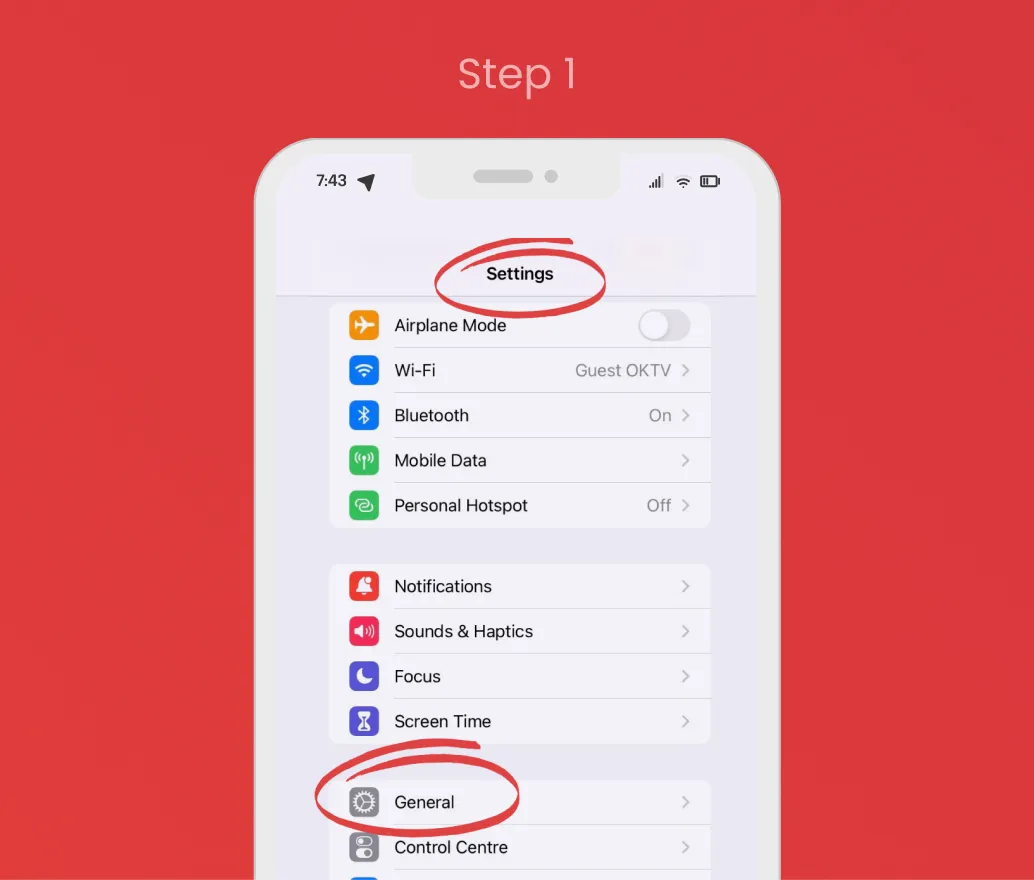
Open the Settings app on your iPhone and select General.
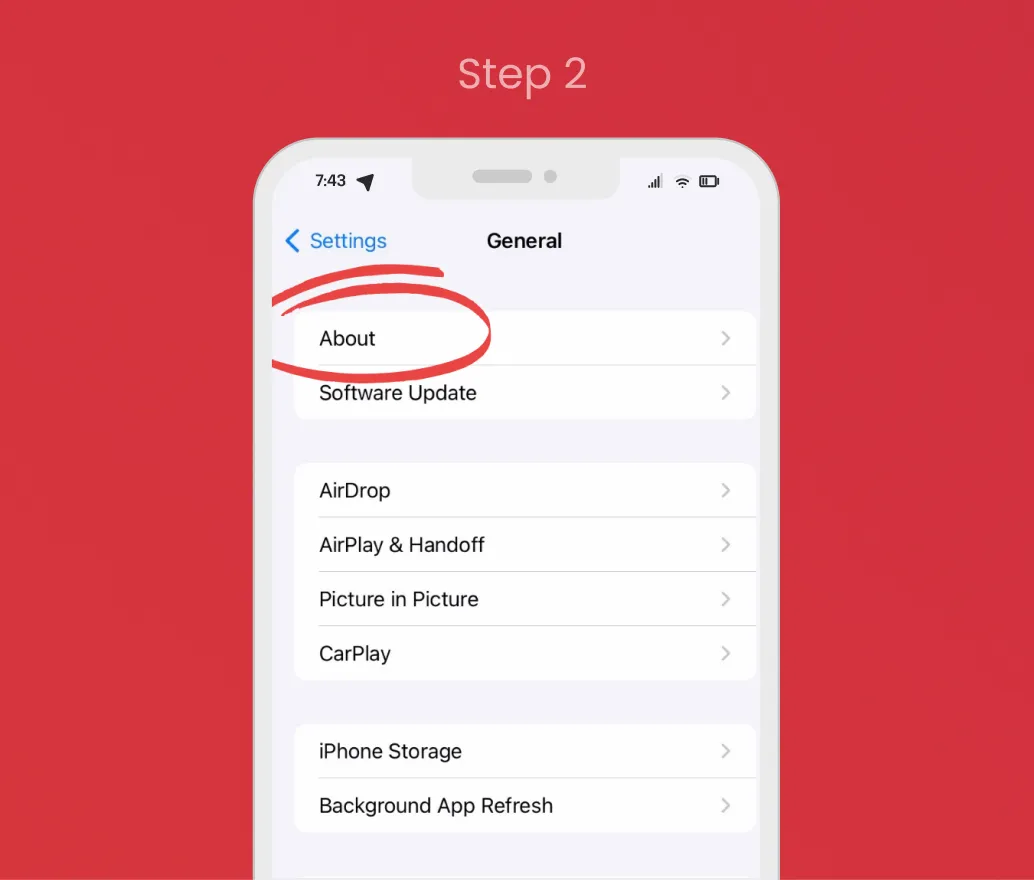
In the General menu, tap on About.
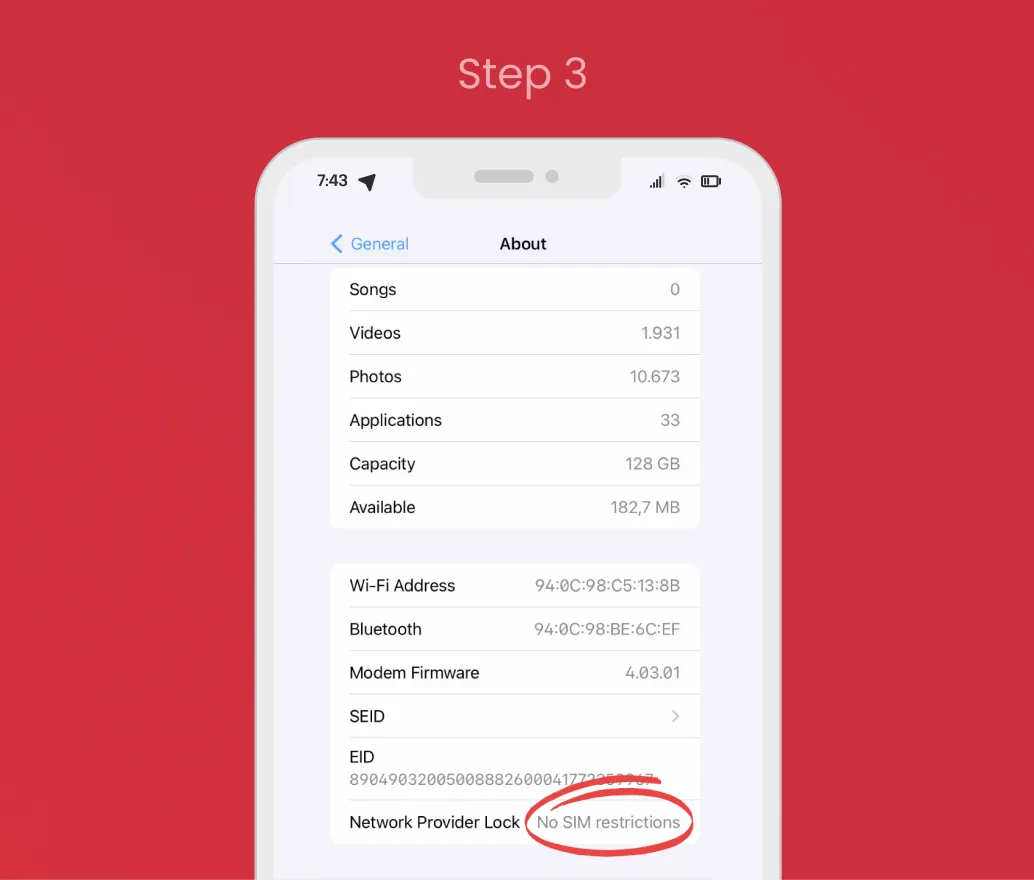
Scroll down to Carrier Lock / Network Provider Lock. If it says "No SIM restrictions", your device is eSIM compatible.
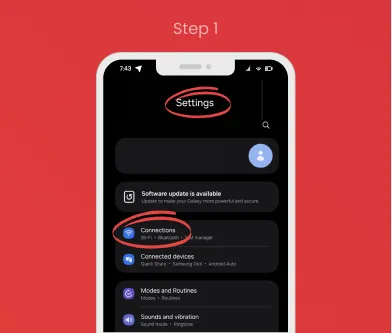
Open the Settings app on your Android device.
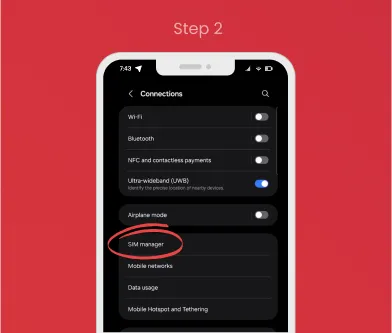
Go to Connections (or Network & Internet on some devices), then tap SIM manager.
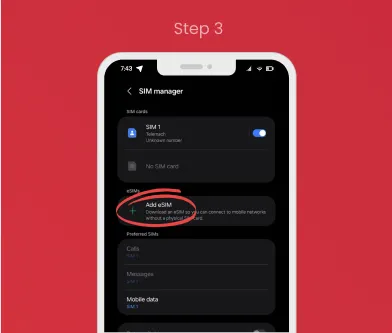
If you see an option to Add eSIM, your device is eSIM compatible.
If you have any questions or need assistance, feel free to reach out to us! We're here to help you with all your eSIM or data needs.